For auto repair shops
Estimates print as estimates. Approved, they become work orders.
You enter parts and labor on your phone, the total adds itself up, and the PDF carries your shop's header.
Send Júlio an emailOpens your email, subject filled in.
- Pastilha de freio dianteira165,00
- Revisão de freios180,00
- Troca da junta do cabeçote500,00
- + 3 itens405,00
- 2titles, each one at the right time
- 0lines retyped on the work order
- 3statuses: estimate, approved, declined
- 1code for the whole shop
From estimate to work order, right at the counter
Tap the numbered dots on the screens.
The customer asks how much
You add parts and labor. The paper prints as ORÇAMENTO, the estimate, under your shop's header.
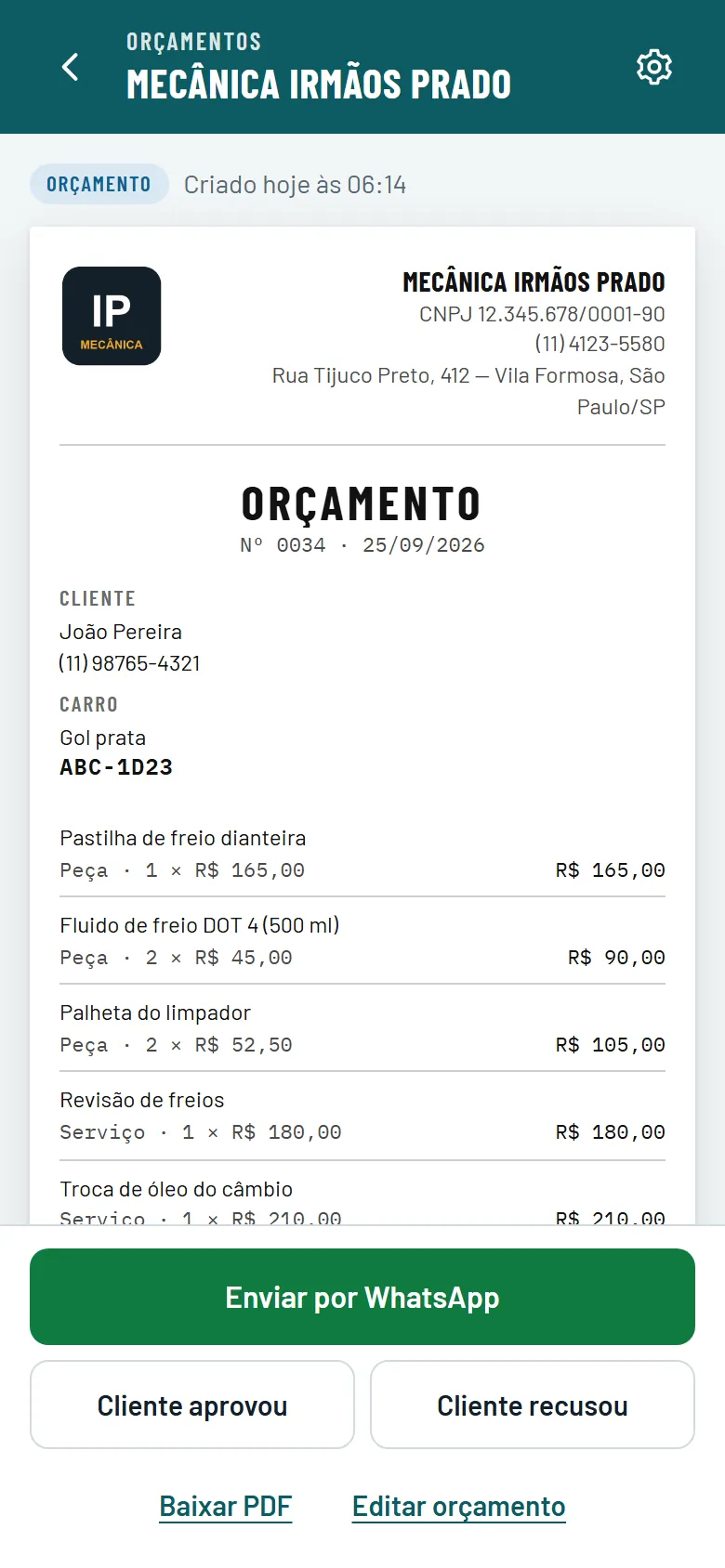
Name, business ID, phone, address and logo, entered once. They sit on top of every paper.
Before approval the title is always ORÇAMENTO, the estimate, with number and date.
Each line says part or labor. The total adds itself up at the bottom.
When the customer says yes, tap here and confirm. The work order comes from this estimate.
Real screen, demo data, in Portuguese.
They approved over the phone
Tap Cliente aprovou (customer approved) and confirm. The same paper becomes ORDEM DE SERVIÇO, the work order, with its own number.
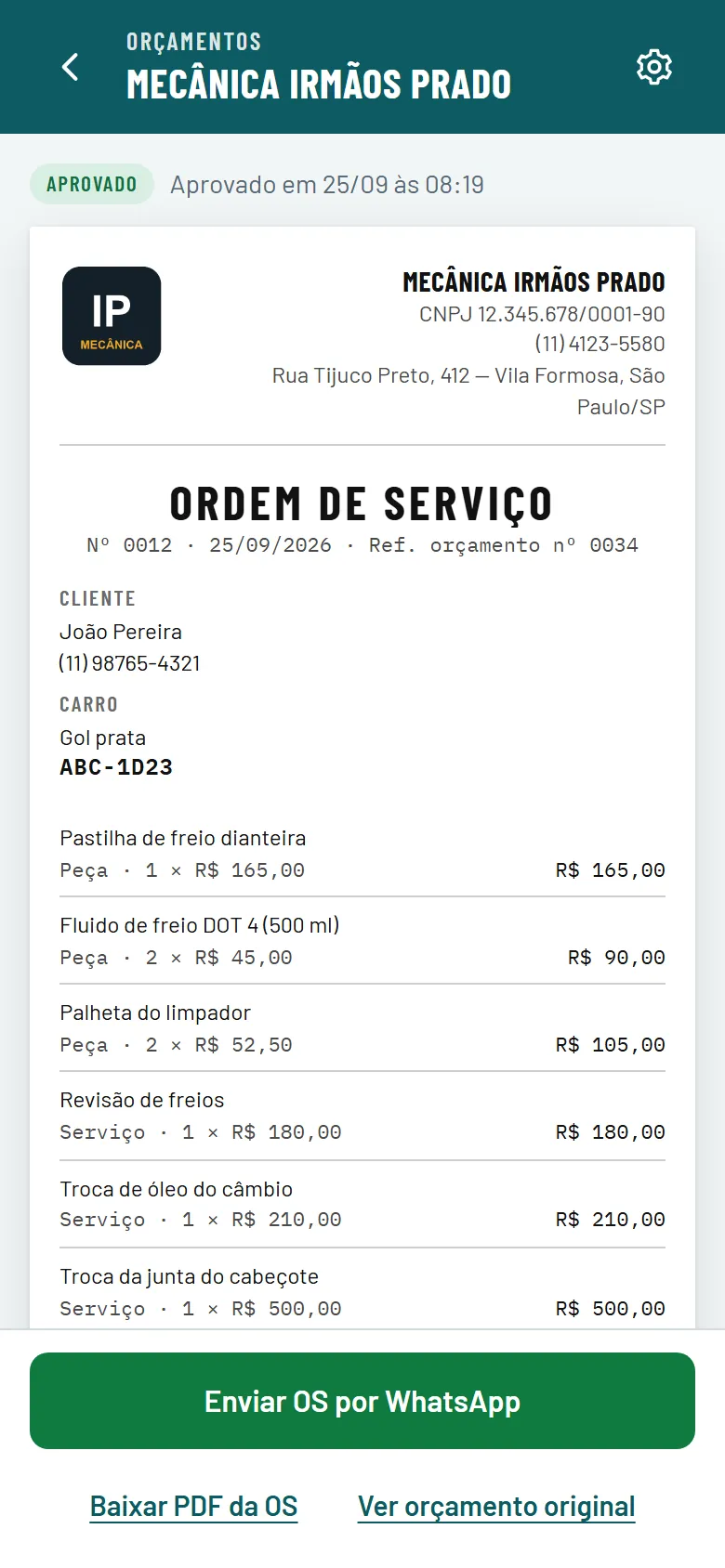
Status changes to Aprovado, approved, with date and time.
The same paper's title changes to ORDEM DE SERVIÇO, the work order.
The work order gets its own number and keeps the estimate number it came from.
The work order copies the lines and the total from the approved estimate.
Real screen, demo data, in Portuguese.
Time to send it
The PDF is saved on your phone and the customer's WhatsApp opens with the message written. You attach the file.
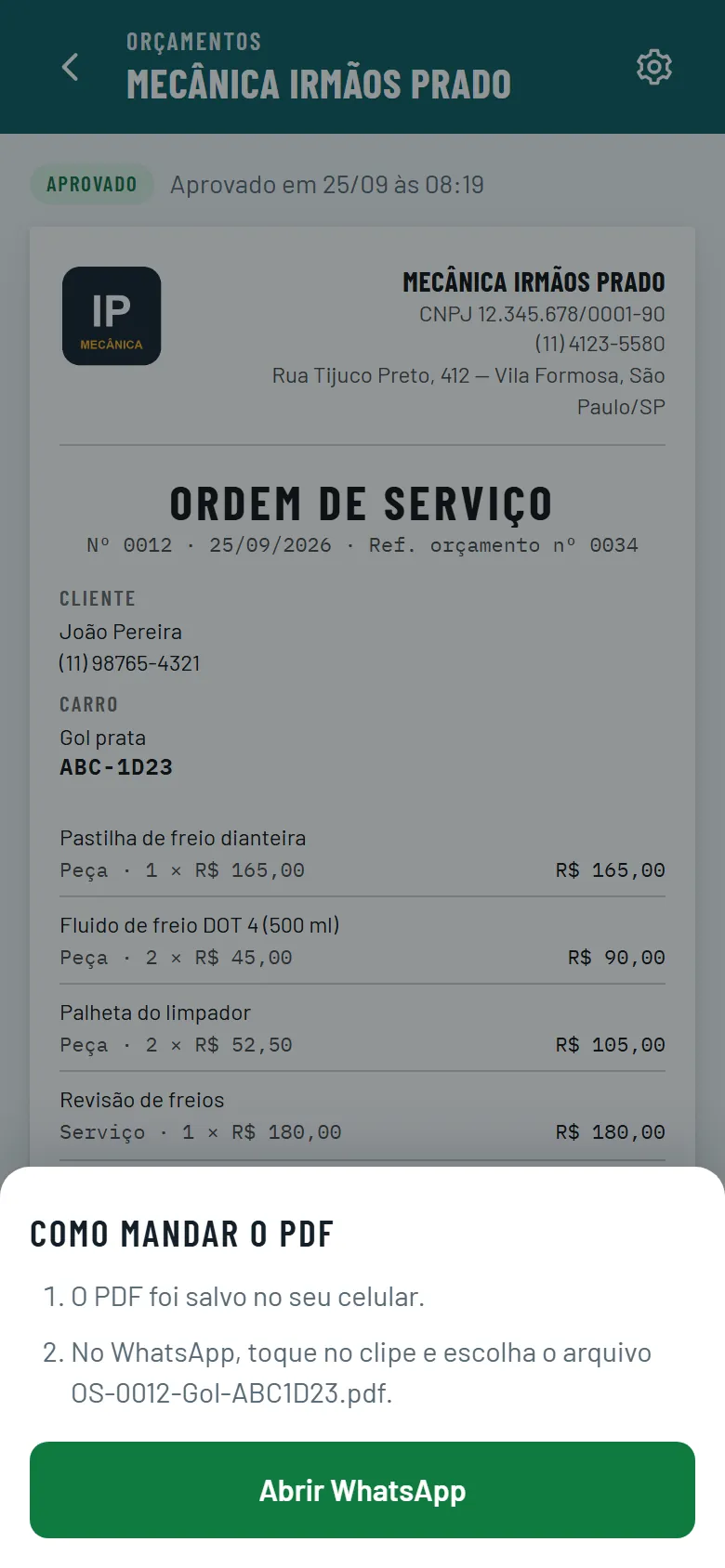
The work order stays open behind. The message quotes its number, the car and the total.
The file is already saved on the phone, named with number, car and plate.
Opens the customer's chat with the message written. You attach the PDF and send.
Real screen, demo data, in Portuguese.
What it does
- Your shop's details on every paper
- Parts and labor kept apart
- Total adds up as you type
- Estimate PDF titled as an estimate
- Approved becomes a numbered work order
- Declined stays on the list
- Search by plate or name
- WhatsApp with the message ready
- One code for the whole shop
Built for the front counter
Each system handles one part of the shop. This one handles the paper that leaves the counter.
- Full shop management systemInventory, accounting, invoicing. The back office.
- Orçamento/OSThe paper your customer gets, with the right title and your shop's header.
Monthly price agreed by email, based on team size.
Questions
Does WhatsApp send it by itself?No. The app downloads the PDF and opens the customer's chat with the message written; you attach the file and send it.
Is it in English?No. Screens, messages and PDFs are in Brazilian Portuguese, with Brazilian formats such as R$ and CNPJ.
Can I edit after approval?The approved estimate is locked, so the work order matches exactly what the customer said yes to.
What if they decline?Tap Cliente recusou (customer declined). The estimate stays on the list marked as declined. Nothing is deleted.
Does it do invoices?No. The work order number belongs to the shop and the paper states it has no tax value. Invoices keep coming from wherever they come from today.
Who sees the estimates?Everyone at the shop signs in with the same code. Without it, nobody sees anything.
How much is it?The monthly price is agreed by email, based on how many people use the code. Tell Júlio your team size and he replies with a number.
Who answers?Júlio built it. He is the one who answers the email and handles any problem.
Want to see it with one of your own estimates?
In ten minutes you build a real estimate together and send it to your own WhatsApp.
Send Júlio an emailOpens your email, subject filled in.